Proton ransomware, also known as Shinra, has emerged as a significant threat in the cybersecurity landscape. This malware infiltrates systems, encrypts vital files, and demands ransom in exchange for the decryption key. As Proton ransomware attacks escalate in frequency and sophistication, individuals and organizations must be prepared to respond effectively.
The Proton Decryptor Tool is a powerful solution designed to recover files encrypted by Proton ransomware. It works by identifying the encryption algorithms used by the ransomware and applying appropriate decryption methods, retrieving necessary keys from secure online servers. The tool offers tailored support for both Windows and ESXi servers, enabling precise decryption and restoration of encrypted files.
Proton ransomware poses a dual threat by not only encrypting data but also threatening to expose sensitive information if the ransom is not paid. Attackers typically gain access through vulnerabilities, phishing emails, or unsecured remote desktop protocols (RDPs). Once inside, the malware employs powerful encryption algorithms to lock files, rendering them inaccessible to the user.
The Growing Threat of Ransomware
Cybersecurity reports indicate a disturbing trend:
Ransomware attacks have increased by over 20% annually in the past five years.
Small and medium-sized enterprises (SMEs) are particularly vulnerable due to limited cybersecurity resources.
The Consequences of Proton Ransomware
The impact of a Proton ransomware attack can be severe and far-reaching:
Operational Disruption: Inaccessible files halt critical processes, causing downtime.
Financial Losses: Beyond ransom payments, organizations face recovery costs and reputational damage.
Data Breaches: Some Proton ransomware variants exfiltrate sensitive data, raising concerns about compliance and privacy violations.
Identifying a Proton Ransomware Attack
Detecting a Proton ransomware attack requires vigilance and familiarity with common signs:
Encrypted Files: Files are encrypted with extensions such as .h0rus13, .helpo, .mqpoa, .yzho, .crypticsociety, .blue, .IZ2, .griffi7, .vx2, .kv5.
Ransom Notes: Sudden appearance of ransom notes, typically named #Restore-files.txt, #Read-for-recovery.txt, #Recovery.txt, #HowToRecover.txt, detailing ransom demands and contact instructions.
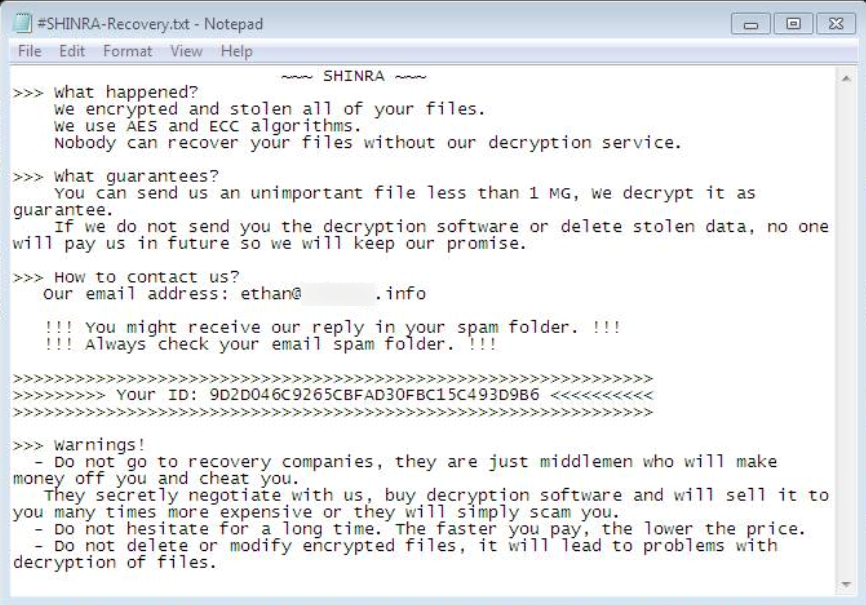
Content of the Ransom Note:
“~~~ SHINRA ~~~ >>> What happened? We encrypted and stolen all of your files. We use AES and ECC algorithms. Nobody can recover your files without our decryption service.
>>> What guarantees? You can send us an unimportant file less than 1 MG, We decrypt it as guarantee. If we do not send you the decryption software or delete stolen data, no one will pay us in future so we will keep our promise.
>>> How to contact us? Our email address: qq.decrypt@gmail.com In case of no answer within 24 hours, contact to this email: qq.encrypt@gmail.com Write your personal ID in the subject of the email.
>>>>>>>>>>>>>>>>>>>>>>>>>>>>>>>>>>>>>>>>>>>>>>>>>>>>>>>>>>>>>> >>>>>>>>> Your ID: – <<<<<<<<<< >>>>>>>>>>>>>>>>>>>>>>>>>>>>>>>>>>>>>>>>>>>>>>>>>>>>>>>>>>>>>>
>>> Warnings! – Do not go to recovery companies, they are just middlemen who will make money off you and cheat you. They secretly negotiate with us, buy decryption software and will sell it to you many times more expensive or they will simply scam you. – Do not hesitate for a long time. The faster you pay, the lower the price. – Do not delete or modify encrypted files, it will lead to problems with decryption of files.
”
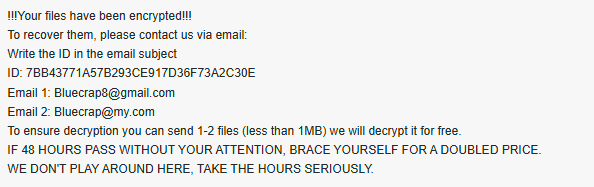
Content of the Ransom Note: “
!!!Your files have been encrypted!!!
To recover them, please contact us via email:
Write the ID in the email subject
ID: 7BB43771A57B293CE917D36F73A2C30E
Email 1: Bluecrap8@gmail.com
Email 2: Bluecrap@my.com
To ensure decryption you can send 1-2 files (less than 1MB) we will decrypt it for free.
IF 48 HOURS PASS WITHOUT YOUR ATTENTION, BRACE YOURSELF FOR A DOUBLED PRICE.
WE DON’T PLAY AROUND HERE, TAKE THE HOURS SERIOUSLY.
“
It also change the Desktop Wallpaper to this text
“Email us for recovery: qq.decrypt@gmail.com
In case of no answer, send to this email:
qq.encrypt@gmail.com
Your unqiue UD: –”
Performance Anomalies: Systems may exhibit slow performance or unusual CPU and disk usage due to the encryption process.
Suspicious Network Activity: Malware often communicates with external command-and-control servers, which may show up as abnormal outbound network traffic.
Using the Proton Decryptor Tool for Recovery
The Proton Decryptor tool is a powerful resource designed to combat Proton ransomware. It is specifically engineered to decrypt files encrypted by this ransomware family, restoring access without requiring a ransom payment.
How the Proton Decryptor Tool Works?
The tool operates by identifying the encryption algorithms used by Proton ransomware and applying appropriate decryption methods. It interacts with secure online servers to retrieve necessary keys or bypass certain encryption mechanisms based on its programming.
Features for Windows Servers
For Windows servers, the Proton Decryptor tool uses an executable paired with a unique personal ID. This ID corresponds to the ransomware’s encryption key, enabling precise decryption.
Features for ESXi Servers
In environments using VMware ESXi, the decryptor employs Python-based scripts and cloud services to unlock encrypted virtual machine files, such as VMDKs.
How to Use Proton Decryptor for Files Encrypted by Proton Ransomware?
To begin recovering your files with Proton Decryptor, simply follow these steps:
Purchase the Tool: Contact us via Whatsapp or email to securely purchase Proton Decryptor and gain instant access to the tool.
Launch with Administrative Access: Run Proton Decryptor as an administrator for optimal performance. An internet connection will be required as the tool connects to secure servers.
Enter Your Victim ID: Identify the Victim ID from the ransom note. Enter this ID for precise decryption.
Start the Decryptor: Start the decryption process and let the tool restore your files to their original state.
The Proton Decryptor tool has a proven track record of successful ransomware recovery. Here are real-world examples of how organizations have benefited from the tool’s capabilities:
Case Study 1: A small financial institution fell victim to Proton ransomware, encrypting sensitive client data. Using the Proton Decryptor tool, the institution restored over 99% of its critical files within 72 hours.
Case Study 2: A healthcare provider’s VMware ESXi servers were targeted, rendering patient records inaccessible. The Proton Decryptor tool, combined with expert assistance, decrypted all VMDK files within 48 hours.
Case Study 3: A new e-commerce business experienced a ransomware attack that locked its inventory database. With the Proton Decryptor, they successfully decrypted all affected files and enhanced their cybersecurity to prevent future incidents.
Preventing Proton Ransomware Attacks
While recovery tools like the Proton Decryptor are invaluable, prevention is always better than cure. Here are essential steps to safeguard against Proton ransomware:
Implement Strong Security Practices: Use robust passwords and enable multi-factor authentication (MFA). Regularly update software and firmware to patch vulnerabilities.
Employee Training: Educate employees on recognizing phishing emails and avoiding suspicious downloads. Conduct regular cybersecurity awareness programs.
Maintain Reliable Backups: Create both on-site and off-site backups of critical data. Test backups regularly to ensure they are functional and up-to-date.
Use Advanced Security Solutions: Deploy endpoint detection and response (EDR) tools to monitor for threats. Enable firewall protections and intrusion detection systems.
Restrict Network Access: Segment networks to limit the spread of ransomware. Disable unnecessary ports and protocols, especially RDP.
Infiltration: Attackers gain access through phishing, RDP, or other vulnerabilities.
Encryption: Files are locked using AES and ECC encryption algorithms.
Ransom Demand: Victims receive notes demanding payment in exchange for the decryption key.
Data Breach Threats: If payment is not made, attackers may threaten to leak sensitive data.
Free Alternative Methods for Recovery
Check for Free Decryptors: Visit platforms like (link unavailable) for free decryption tools.
Restore from Backups: Use offline backups to recover encrypted data.
Utilize Volume Shadow Copy: Check if Windows’ shadow copies are intact using vssadmin list shadows.
Leverage System Restore Points: Revert your system to a state prior to the attack if restore points are enabled.
Data Recovery Software: Tools like Recuva or PhotoRec can sometimes recover remnants of unencrypted files.
Engage with Authorities: Report incidents to organizations like the FBI or CISA, who may have ongoing efforts to counter specific ransomware strains.
Emerging Trends in Ransomware Attacks
Proton ransomware exemplifies broader trends in ransomware, including:
Double Extortion: Threatening data leaks alongside encryption.
Ransomware-as-a-Service (RaaS): Allowing attackers to rent tools and distribute malware with minimal effort.
Organizations must adopt proactive cybersecurity strategies to combat these evolving threats.
Conclusion
Proton ransomware represents a grave threat to individuals and organizations alike. Its ability to encrypt data and extort victims has far-reaching consequences. However, tools like the Proton Decryptor provide a ray of hope by enabling safe and effective data recovery. By prioritizing prevention, investing in cybersecurity, and using trusted recovery tools, businesses can defend against ransomware threats and recover swiftly if attacks occur.
Introduction: The Escalating Threat of LCRYPTX LCRYPTX ransomware, also referred to as the .lcryx ransomware, has recently grown as a significant cybersecurity threat. This malicious software infiltrates systems, encrypts essential files, and demands victims pay a ransom—typically in cryptocurrency—to regain access. As ransomware attacks become increasingly sophisticated and widespread, recovering data encrypted by LCRYPTX has…
Introduction to Sysdoz Ransomware Sysdoz ransomware is a newly identified file-encrypting malware strain discovered during routine analysis of submissions uploaded to VirusTotal. It follows the behavioral pattern of modern crypto-extortion threats, designed to lock user data and pressure victims into contacting the attackers for decryption. The ransomware encrypts important files, appends a long victim-specific identifier…
LockBit 4.0 ransomware is the latest evolution of the notorious LockBit ransomware family, which has been a persistent threat to businesses and organizations worldwide. Emerging after the FBI targeted the servers of LockBit 3.0 in February 2024, this new version builds on its predecessors’ strengths while introducing enhanced capabilities and strategies to evade detection and…
Overview KOZANOSTRA ransomware has emerged as a formidable force in the cybercrime landscape, notorious for breaching systems, encrypting essential data, and demanding hefty ransoms in exchange for decryption keys. As its attack vectors continue to evolve and target a wider range of platforms, recovering locked files has become a critical challenge for both individuals and…
Introduction The digital landscape is constantly evolving, and with it, so are the threats we face. Among the most insidious of these is ransomware, and a particularly concerning strain has emerged: Dark Intel ransomware. This malicious software has become a significant menace in the cybersecurity realm, designed to infiltrate systems, encrypt critical files, and hold…
Introduction: The Rising Threat of DataLeak Ransomware DataLeak ransomware has emerged as a formidable cyber adversary, compromising systems, encrypting valuable files, and coercing victims into paying hefty ransoms. Its increasingly sophisticated techniques make data recovery challenging for individuals, IT teams, and businesses alike. This comprehensive guide delves into the workings of DataLeak ransomware, its impact,…