Our FIND Decryptor: Fast, Secure, and Expert-Engineered
FIND ransomware, a dangerous variant from the notorious Dharma family, has emerged as a significant threat to individuals and enterprises alike. Our cybersecurity specialists have reverse-engineered its encryption mechanisms and developed a proprietary FIND Decryptor capable of restoring encrypted data without paying ransom. Built for Windows and enterprise environments, this tool leverages AI-powered pattern recognition and blockchain-integrity verification to ensure precise and tamper-proof recovery.
The decryptor analyzes ransom notes and matches them with unique victim IDs to map specific encryption batches. Even in cases where a ransom note is missing, our universal decryptor option handles recent FIND variants with updated key obfuscation methods. It performs read-only scans before attempting decryption, ensuring no data corruption or re-encryption occurs during the process.
Time is crucial when responding to ransomware. If your system is hit by the FIND ransomware, follow these steps carefully to minimize damage.
1. Disconnect from the Network Immediately isolate infected systems from local networks, shared drives, and cloud sync platforms. This stops the ransomware from spreading further.
2. Preserve All Evidence Do not delete encrypted files or the ransom notes. Retain logs, memory dumps, and network traffic data — they may be invaluable during forensic analysis or recovery attempts.
3. Avoid Rebooting or Formatting Shutting down or rebooting may trigger additional encryption or wipe recovery points. Leave systems powered but disconnected until experts assess them.
4. Contact a Professional Recovery Team DIY decryption attempts or reliance on shady forums can permanently corrupt files. Contact experienced recovery professionals who specialize in Dharma variants for structured, risk-free restoration.
Understanding the FIND Ransomware Threat
The FIND ransomware, identified as part of the Dharma lineage, follows the family’s typical encryption behavior — encrypting files across local drives and network shares while disabling the Windows firewall. Once executed, it renames each file with a complex structure containing a victim ID, an attacker email, and the .FIND extension. For example: photo.jpg → photo.jpg.id-9ECFA84E.[findourtxt@tuta.io].FIND
Victims are presented with two ransom notes — one displayed as a popup and another as a text file (info.txt). Both notes instruct victims to contact the attackers via email to obtain a decryption key. The criminals threaten to leak stolen data to third parties if payment is not made promptly.
How FIND Ransomware Operates?
FIND operates using a hybrid cryptographic model similar to other Dharma variants, often combining symmetric and asymmetric encryption to render files inaccessible. Upon infection, it attempts to:
Terminate security processes and disable system protection.
Encrypt critical data, including shadow copies.
Add itself to the system’s autorun registry for persistence.
Collect system and location data to tag victims.
The ransomware frequently spreads through malicious email attachments, pirated software downloads, or compromised RDP connections. In many cases, brute-force attacks on weak RDP credentials serve as the entry point.
Free Recovery Options for FIND Ransomware
Not every ransomware case requires payment or advanced decryptors. Several recovery methods can work for earlier or less complex variants.
1. Free Decryptor Tools Older Dharma-based variants have publicly available decryptors. However, FIND’s latest builds use updated encryption, making generic decryptors largely ineffective. Tools like Emsisoft Decryptor for Dharma may recover limited file sets in specific cases.
2. Backup Restoration If secure backups exist, they remain the fastest path to recovery. Ensure backups are disconnected from the infected network and verify their integrity before restoration.
3. Volume Shadow Copy Recovery Although FIND typically deletes shadow copies, quick responses might preserve them. Tools like Shadow Explorer can be tested in isolated environments to restore file versions.
Paid Recovery and Professional Decryption Options
1. Ransom Payment (Not Recommended) Victims may be tempted to pay the ransom. However, there’s no guarantee the attackers will provide a valid decryptor, and payments often violate cybersecurity compliance laws.
2. Negotiation Through Third Parties Negotiation firms can sometimes lower ransom demands or verify the legitimacy of decryption offers. However, this process is costly, risky, and not always successful.
3. Our Proprietary FIND Decryptor Our team has developed a specialized FIND Decryptor that safely restores encrypted files through AI-enhanced key mapping and blockchain validation. It reverse-engineers FIND’s encryption sequence, identifies weaknesses in its implementation, and decrypts files securely via cloud processing. Each operation generates detailed logs and integrity checks for forensic transparency.
Step-by-Step FIND Recovery Guide with FIND Decryptor
Assess the Infection Identify file extensions: .FIND and confirm presence of info.txt
Secure the Environment Then, disconnect affected systems and ensure no further encryption scripts are active.
Engage Our Recovery Team Submit sample encrypted files + ransom note for variant confirmation, and we will initiate analysis and provide a recovery timeline.
Run Our Decryptor Launch the FIND Decryptor as an administrator for optimal performance. An internet connection is required as the tool connects to our secure servers.
Enter Your Victim ID: Identify the Victim ID from the ransom note and enter it for precise decryption.
Start the Decryptor: Initiate the decryption process and let the tool restore your files to their original state.
Offline Methods: These are ideal for air-gapped or sensitive environments. These only require external drive transfer and a secure boot system. Online Methods: These provide faster recovery and live expert support, just like our FIND Decryptor. These methods require an encrypted channel and a secure file upload.
Technical Breakdown: Tools, Techniques, and Procedures (TTPs)
FIND employs a series of sophisticated tools and techniques during its operational chain:
Initial Access FIND often enters systems through spear-phishing emails or drive-by downloads. Exploitation of remote desktop vulnerabilities and unpatched applications remains its primary access vector.
Execution and Encryption The payload executes via malicious executables disguised as system utilities. It uses PowerShell scripts and scheduled tasks to maintain execution persistence.
Defense Evasion The malware disables Windows Defender and firewalls, exploiting legitimate system processes like svchost.exe to hide its activities. It also clears event logs to erase traces of infection.
Credential Access Tools like Mimikatz are occasionally deployed to extract system and user credentials, facilitating lateral movement across networks.
Exfiltration and Extortion Before encryption begins, FIND may exfiltrate sensitive files to external servers. This supports its double extortion model, where attackers threaten to leak stolen data publicly.
MITRE ATT&CK Mapping
T1078 – Valid Accounts
T1059 – Command and Scripting Interpreter
T1047 – Windows Management Instrumentation
T1003 – Credential Dumping
T1486 – Data Encryption for Impact
T1490 – Inhibit System Recovery
Indicators of Compromise (IOCs)
IOCs help identify FIND ransomware infections early. Key indicators include:
File Extensions: .FIND appended to encrypted files
Registry Modifications: Keys in HKCU\Software\Microsoft\Windows\CurrentVersion\Run
Network Activity: Outbound communication to suspicious mail servers or TOR domains
Ransom Note Dissected: What FIND Ransomware Says and Why?
If you find a popup message and a file named “info.txt” in your directories, it’s a clear sign your system has been compromised by the FIND ransomware (.FIND) variant. These ransom notes serve as both a psychological and operational tool — warning victims, creating urgency, and initiating negotiation channels. Below is an overview of what the note contains and what each part means.
The ransomware leaves two ransom notes:
A popup window that immediately appears after encryption.
All your files has been encrypted! Don’t worry, you can return all your files! If you want to restore them, contact us: findourtxt@tuta.io YOUR ID – If you have not answered by mail within 12 hours, contact mail:findourtxt@mailum.com Free decryption as guarantee Before paying you can send us up to 3 files for free decryption. The total size of files must be less than 3Mb (non archived), files should not contain valuable information. (databases,backups, large excel sheets, etc.) Some of your data has been downloaded
In case if you refuse to cooperate all downloaded data will be transfered to third parties. Financial implications: The threat of data breach could result in significant fines and legal action. Reputational risks: Data breach may lead to a loss of trust from customers and partners, as well as negative consequences for your future work. We strongly recommend you to contact us directly, to avoid the extra fee from middlemans and lower the risks of scam.
Attention! Do not rename encrypted files. Do not try to decrypt your data using third party software, it may cause permanent data loss. Decryption of your files with the help of third parties may cause increased price (they add their fee to our) or you can become a victim of a scam.
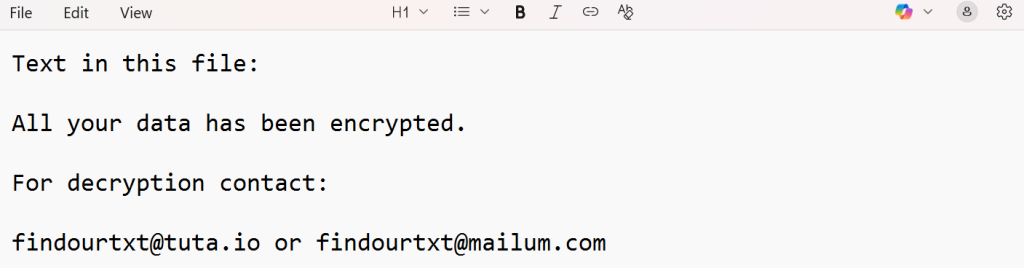
A text file (“info.txt”) stored in every affected directory.
All your data has been encrypted.
For decryption contact:
findourtxt@tuta.io or findourtxt@mailum.com
Statistical Insights: FIND Ransomware Impact
To better understand the reach of FIND ransomware, our research indicates it primarily affects small to mid-size organizations, especially in regions with high RDP exposure and outdated cybersecurity policies.
Top Countries Affected
Industries Most Targeted
Timeline of Major FIND Attacks (2023–2025)
Conclusion: Regain Control of Your Encrypted Data
FIND ransomware continues to evolve, using sophisticated encryption and extortion techniques to exploit weak defenses. However, recovery is possible with the right approach and expert tools. Victims should avoid paying ransom and instead consult certified recovery specialists for professional decryption.
Our FIND Decryptor provides a trusted, verified path to restore systems quickly and safely. With a combination of blockchain validation, AI-based analysis, and human expertise, it ensures reliable recovery and complete operational restoration.
Frequently Asked Questions
Only early variants might be recoverable using free decryptors. Newer FIND builds require professional tools.
Yes, the note helps identify the victim ID required for accurate key mapping.
It’s the custom file extension added by FIND ransomware to encrypted files.
Offline recovery is supported, but online cloud verification ensures safer results.
Time depends on the volume and complexity of encrypted data. Most systems recover within 24–48 hours.
Absolutely. It uses read-only scans, cloud sandboxing, and blockchain verification for tamper-proof recovery.
Introduction: Confronting the Growing Threat of DarkHack Ransomware DarkHack ransomware has emerged as a formidable adversary in the world of cybersecurity, breaching secure systems, encrypting critical files, and demanding hefty ransoms for decryption. As this threat becomes increasingly sophisticated and widespread, the challenge of recovering compromised data grows more complex for both individuals and businesses….
Our Miga Decryptor: Rapid Recovery, Expert-Engineered Our research team reverse-engineered parts of the Miga ransomware encryption logic and developed a secure decryptor that has restored data for multiple organizations worldwide. Compatible with Windows, Linux, and VMware ESXi, the decryptor emphasizes safety, reliability, and forensic accuracy. Related article: How to remove Proton/Shinra Ransomware (.OkoR991eGf.OhpWdBwm) and restore…
Our H2OWATER Decryptor: Rapid Recovery, Expert-Engineered Based on forensic analysis and cryptographic review, our recovery framework leverages both AI-assisted entropy analysis and key-mapping heuristics to maximize chances of restoring encrypted files without ransom payments. The ransomware is coded in Go and uses AES-256 in CTR mode for file encryption combined with RSA-2048 for key protection….
A NOCT ransomware attack often strikes without warning. Files that were accessible moments earlier suddenly refuse to open, their icons change, and their names expand to include the “.NOCT” extension. For example, a simple file such as 1.jpg becomes 1.jpg.NOCT. Alongside file encryption, the desktop wallpaper is replaced with a threat image, and a ransom…
Introduction Spectra ransomware, based on the Chaos ransomware family, has emerged as a severe cybersecurity menace, infecting systems, encrypting valuable files, and demanding hefty ransom payments for decryption. As cybercriminals refine their attack methods, retrieving encrypted data remains a daunting challenge for individuals and businesses alike. This comprehensive guide explores the behavior of Spectra ransomware,…




4 Comments