Our Wiper Recovery Engine: Precision, Safety, and Forensic Discipline
Our cybersecurity recovery team has studied the .ahG5ooth extension ransomware (a suspected wiper-style malware) that appears to encrypt or wipe data and leave RECOVERY.txt or RECOVERY.hta ransom files.
We have constructed a specialized recovery engine designed for Windows, NAS (file servers), and mixed environments that handles forensic integrity, careful data salvage, and validation.
To begin the analysis and possible recovery, you will need:
A copy of the ransom note (e.g. RECOVERY.txt or RECOVERY.hta)
Several sample files before and after .ahG5ooth extension (if you have backups or unencrypted originals)
Metadata: file timestamps, original sizes, file system logs, journaling data
Administrator or root privileges on the impacted system
Disk images or forensic captures (if possible) for deeper analysis
Immediate Actions After a .ahG5ooth / Wiper Incident
Disconnect Immediately
Isolate the affected system from any network shares, backup systems, and Internet connectivity to prevent further damage or propagation.
Preserve All Evidence
Do not delete the ransom note or affected files. Preserve full disk or partition images if possible to keep data for later forensic analysis.
Don’t Reboot or Write to Disk
Any writes may overwrite recoverable fragments. Avoid rebooting which could trigger destructive routines in the malware.
Seek Expert Help
Because wiper malware often destroys data irreversibly, bring in data recovery and forensic specialists early. They can assess if any salvage is possible before further operations damage what remains.
Understanding Wiper Ransomware — What It Does
The .ahG5ooth extension case is believed to be a type of wiper ransomware (or destructive malware masquerading as ransomware). Unlike true encryption-only ransomware, wipers sometimes leave files with 0 KB size or partially overwritten contents. Victims report:
Original files like 1.jpg being replaced by 1.jpg.ahG5ooth with 0 KB size
Ransom note files named RECOVERY.txt (and sometimes RECOVERY.hta)
The note claims the same format as some known ransomware notes (offering keys, demands), but in many cases, the data cannot be decrypted because it’s destroyed, not just locked
Because of this, paying the ransom usually yields nothing. It becomes a data destruction incident more than a reversible encryption event.
Decryption / Recovery Options for Wiper / .ahG5ooth
Below are the realistic approaches for such an incident:
1. Free / Native Methods
Backup Restoration
If you have unaffected, offline backups, restoring from those is by far the safest and most reliable outcome. Be sure backups were untouched by the malware.
File System Journals & Shadow Copies
If the malware did not fully purge journaling or shadow copy metadata, forensic tools may recover fragments or prior versions. This is only effective when the malware is sloppy or partial.
Snapshot Rollback
In environments that use VM snapshots or filesystem snapshots (ZFS, Btrfs, etc.), rolling back to a snapshot prior to the attack may restore data—assuming the malware couldn’t remove snapshots.
2. Professional / Paid Recovery & Forensics
Data Recovery Services
Professional disk recovery firms may attempt low-level forensic carving, block-level restoration, or reconstruct partially overwritten segments using specialized tools and hardware.
Legal / Incident Response
Ranking this as a destructive attack rather than ransomware, response teams often treat this as a breach. They coordinate forensic preservation, regulatory reporting, and may negotiate for information, though decryption is often impossible.
Caution on Paying
Since this behavior is consistent with wipers, paying the “ransoms” almost never yields valid decryption keys. The attackers may have no capacity to recover your data—they only destroyed it.
How Our Wiper Recovery Engine Works?
After analyzing multiple .ahG5ooth samples and recovery reports, our team developed a specialized recovery pipeline:
Signature & Pattern Detection The engine scans for file suffix patterns (random 8 alphanumeric extension) and matches to known wiper families.
Forensic Fragment Search It probes file slack, unallocated sectors, and journaling entries hoping to reassemble parts of original files.
Comparison & Validation Any candidate recovery is validated via checksums or cross-reference with prior backup versions.
Safe Data Export Recovered fragments are exported to separate safe media for review—never overwriting original volume.
Step-by-Step .ahG5ooth Recovery Guide
Assess the Infection Confirm files use the .ahG5ooth suffix, note file sizes (e.g., 0 KB), and save the RECOVERY.txt/RECOVERY.hta ransom note.
Secure the Environment Isolate affected systems and create forensic disk images. Do not write to the original volumes.
Engage Our Recovery Team Send samples, disk images, and the ransom note so analysts can triage the incident and advise on recoverability.
Run Our Recovery Engine Execute the tool against forensic copies (offline or cloud-assisted mode). It searches unallocated space, file slack, and journals to reconstruct files.
Enter Victim ID (If Present) If the note contains an ID, provide it to help match the sample to known behaviors; otherwise proceed with fragment reconstruction.
Start the Recovery Process Begin reconstruction; recovered files are written to a separate volume with integrity reports and confidence scores.
Offline Recovery: Performed on local forensic images, without connecting to any external systems. This is ideal when systems are air-gapped or highly sensitive.
Online / Remote Recovery: In some cases where samples must be uploaded to specialized labs, encrypted channels are used to share small fragments for deep analysis. This is riskier and used only when offline recovery fails.
Our recovery solution supports both modes—depending on your security and privacy constraints.
What Is Wiper Ransomware? Why It’s Worse Than Encryption?
Wiper ransomware is malware that aims to destroy data, not just encrypt it. Whereas classic ransomware holds your data hostage with reversible encryption, wipers overwrite, delete, or corrupt data beyond repair.
In the .ahG5ooth case, symptoms include:
Files renamed with a random 8-character extension (e.g. .ahG5ooth)
Many files showing 0 KB size or partially overwritten content
Ransom notes (RECOVERY.txt / RECOVERY.hta) that mimic ransomware demand language
No credible decryptors or recovery promises because the attackers may not have preserved any key mechanism
Because of this destructive behavior, wiper incidents are often considered cyber sabotage or political attacks, not just financial crime.
Custom destructive routines that overwrite allocation tables
Recon & Access Tools:
Standard credential dumpers, remote admin tools
Use of scripts or built-in OS tools to disable backups, shadow copies, or journaling
Evasion Methods:
Malware may disable antivirus, clear logs, erase system restore points
Use of rootkits or kernel drivers to bypass detection
Data Eradication:
Overwriting free space
Deleting journal entries
Zeroing out sectors
IOCs (Indicators of Compromise)
File markers & names
File extension appended: .ahG5ooth (example: photo.jpg.ahG5ooth) — pattern may vary; many wiper families append an 8-character random alphanumeric suffix.
Files reported as zero bytes or truncated (e.g., original 1.jpg replaced by 1.jpg.ahG5ooth showing 0 KB).
Strings / contents to look for
Exact ransom note text fragments (save whole file): typical lead line such as “All your files are encrypted” or language indicating recovery instructions; keep the entire note for triage.
Any e-mail address, chat ID, or contact token inside the note — capture exactly as-is (useful for tracking and correlating incidents).
System & artifact behavior
Deletion of Windows Volume Shadow Copies and System Restore points.
High rate of file truncation or zeroing of file clusters.
Modified or erased file system journal entries (NTFS $LogFile or ext4/journal metadata).
Rapid mass writes to many files/volumes within a narrow time window.
Unusual processes or scripts running from Temp or user profile folders during the incident timeframe.
Network & access indicators
Authentication failures or a burst of successful logins (RDP/VPN) prior to encryption/wiping.
Outbound transfers to cloud file services or unknown hosts may indicate exfiltration attempts preceding wiping. Capture relevant firewall and proxy logs.
Forensic hashes & detection
Preserve sample files (even if 0 KB) and compute SHA256/MD5 hashes for repository comparison.
Create YARA signatures based on unique ransom-note strings or binary markers found in any captured sample payload. Example YARA rule elements: ransom-note header phrases, the .ahG5ooth literal, or unique binary constants from the malware sample.
Evidence collection checklist
Full copies (bit-for-bit) of affected disks or partitions.
A copy of every ransom note file (text and .hta).
Representative encrypted/wiped files and their filesystem metadata (MFT entries, inodes).
Relevant event logs, EDR alerts, and network logs covering the event window.
Memory dump if captured before reboot (may contain residual keys or process traces).
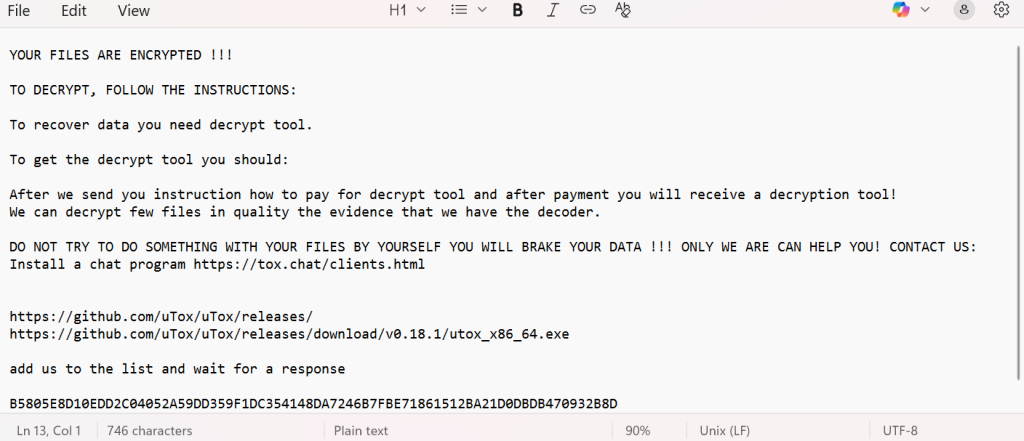
Ransom Note — Typical Content & Handling
What the note usually contains
YOUR FILES ARE ENCRYPTED !!!
TO DECRYPT, FOLLOW THE INSTRUCTIONS:
To recover data you need decrypt tool.
To get the decrypt tool you should:
After we send you instruction how to pay for decrypt tool and after payment you will receive a decryption tool!
We can decrypt few files in quality the evidence that we have the decoder.
DO NOT TRY TO DO SOMETHING WITH YOUR FILES BY YOURSELF YOU WILL BRAKE YOUR DATA !!! ONLY WE ARE CAN HELP YOU! CONTACT US:
Install a chat program https://tox.chat/clients.html
Defensive Measures & Best Practices to Guard Against Wipers
Immutable Backups & Air-Gapping: Keep backups off-line or in write-once storage that malware cannot reach.
Network Segmentation: Limit access between user systems and backup infrastructure.
Patch & Harden Systems: Close vulnerabilities in NAS, SMB, remote admin ports, and firmware.
Strict Access Control: Limit administrative access, avoid using shared keys or weak credentials.
Continuous Monitoring: Use advanced endpoint and file integrity monitoring to detect early wipe behavior.
Boot Integrity Protections: Use secure boot, TPM, and drive-level protection to prevent low-level overwrites.
Conclusion: Recover What You Can, Prepare for the Worst
The .ahG5ooth incident appears to be part of a wiper ransomware attack—where data is often irreversibly damaged, not simply locked. Because of its destructive nature, paying the ransom is unlikely to yield results.
Frequently Asked Questions
It’s a wiper-type malware that renames files with the .ahG5ooth extension and leaves ransom notes named RECOVERY.txt or RECOVERY.hta. Instead of encrypting data, it destroys or zeros out files.
No. The data is usually erased, not encrypted, so standard decryption is impossible.
Restore Encrypted Files Safely and Efficiently The Privaky ransomware (.lbon) is a newly surfaced encryption threat derived from the Chaos ransomware family, capable of locking your files and demanding ransom payments in Bitcoin. Designed to paralyze victims by encrypting documents, databases, and media, Privaky has already impacted individuals and organizations globally. This guide explores every…
In the deceptive world of cybercrime, few threats are as ironically named as the Happy (MedusaLocker) ransomware. Discovered by researchers analyzing new submissions, this malicious program is anything but a cause for celebration. It is a ruthless and efficient variant of the notorious MedusaLocker family, designed to encrypt your critical data and hold it for…
Introduction DarkN1ght ransomware has emerged as a significant threat in the cybersecurity landscape, infiltrating systems, encrypting vital files, and demanding ransom in exchange for decryption keys. As the frequency and sophistication of these attacks escalate, individuals and organizations are grappling with the daunting task of data recovery. This comprehensive guide provides an in-depth look at…
Introduction FMLN ransomware has quickly become a major cybersecurity nightmare, infiltrating systems, locking down important files, and forcing victims to pay steep ransoms. With ransomware attacks getting more advanced by the day, recovering encrypted data is now tougher than ever—whether you’re an individual or a business. In this guide, we’ll break down what FMLN ransomware…
LockBit 3.0 Black Ransomware: Removal & Recovery By Incident Response Team | September 22, 2026 Executive Threat Briefing A highly destructive variant of the LockBit 3.0 Black ransomware has been identified actively targeting enterprise environments. This payload utilizes randomly generated 9-character alphanumeric extensions—such as .EGDN84DGq—and drops customized ransom notes matching the extension (e.g., EGDN84DGq.README.txt). Executing…
An intrusion by the Earth Baxia threat actor, now observed deploying a ransomware strain that appends the .baxia extension, represents a catastrophic fusion of APT-level tactics and crypto-extortion. This is not a standard malware incident; it is a targeted operation where a sophisticated adversary first establishes a persistent foothold for espionage and then executes a…


One Comment