WhiteLock (family: Win32/Ransom.WhiteLock) is actively encrypting Windows environments and appending the .fbin extension. The threat actors drop a ransom note named c0ntact.txt, demand 4 BTC, and set a 4-day deadline. They claim data theft and direct victims to a Tor site where you authenticate with a client ID from the note. No reputable public decryptor currently exists for WhiteLock, so recovery hinges on sound incident response, backup strategy, and careful forensics.
Read-Only Assessment: We collect copies of the ransom note (c0ntact.txt) and a small sample of .fbin files, then run non-destructive entropy and structure checks to confirm the variant and gauge recoverability.
Targeted Hunt: We search for WhiteLock IOCs (see list below), the spread pattern, and signs of data exfiltration.
Safe Restore Paths: We prioritize clean restores (immutable/offline backups, snapshots) and file-system journaling where available.
Negotiation Advisory (Optional): If business risk compels negotiation, we validate contact channels and insist on verified sample decryption first. (Paying ransom is discouraged by law-enforcement guidance.)
Access to a representative set of .fbin encrypted files
Relevant logs (EDR, Windows event logs, firewall, VPN, proxy)
Admin privileges (local/domain) for containment and restore
Immediate Steps to Take After a WhiteLock Ransomware Attack
Disconnect Immediately Isolate affected hosts and shared storage. Block east-west movement and outbound Tor/proxy traffic.
Preserve Everything Keep c0ntact.txt and all .fbin files. Preserve EDR telemetry, Windows logs, and any suspicious binaries or scripts for analysis.
Avoid Reboots/“Cleanup” Don’t reboot indiscriminately or “tidy up” artifacts; you may destroy evidence or trigger leftover tasks.
Contact a Ransomware Recovery Expert Skip shady “universal decryptors.” Engage experienced IR pros who can validate options and reduce downtime.
How to Recover from WhiteLock and Restore Your Data?
WhiteLock uses fast mass-encryption and a pressure-based extortion note. While no vetted decryptor exists yet, you still have effective, safe recovery routes.
Recovery Options
1) Free/Native Options (Best-Effort)
Backups / Snapshots: Restore from offline/immutable backups or hypervisor snapshots taken before encryption. Verify integrity first by mounting read-only and sampling files.
Shadow Copies (if any): Often deleted by ransomware; if present and safe, recover selectively after environment is clean.
File-System & App Artifacts: App-level caches, temp exports, or replicas (DB replicas, object storage versions) can reduce loss.
Targeted carving of working directories (design/CAD/DCC tools) may salvage interim outputs.
3) Paid Paths (Caution)
Negotiation/Payment: There’s no guarantee of a working decryptor, and you may face legal/reporting obligations. Use reputable negotiators only, demand proof via sample decrypt, and perform sandboxed testing.
What Is WhiteLock Ransomware?
WhiteLock is a Windows-focused ransomware family that encrypts files to the .fbin extension and drops c0ntact.txt with a 4-BTC/4-day demand. The note claims data exfiltration and threatens reputation damage, sale to competitors, and public leaks. Victims are told to install Tor and log into a portal with a client ID. (Sample ID style shown publicly: long hex string.)
WhiteLock Playbook: Likely Intrusion Flow (What to Hunt)
While detailed third-party reverse-engineering isn’t public yet for WhiteLock, current-gen ransomware operations commonly follow this pattern. Use it to hunt and contain:
Initial Access
Phishing, exposed RDP/VPN, web-app vulns, or stolen credentials.
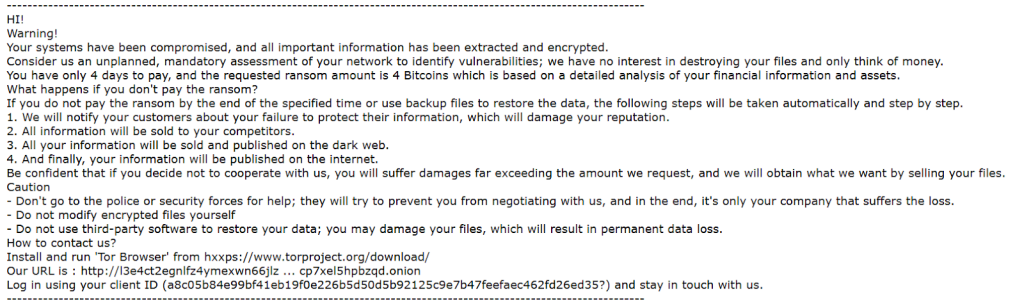
Your systems have been compromised, and all important information has been extracted and encrypted.
Consider us an unplanned, mandatory assessment of your network to identify vulnerabilities; we have no interest in destroying your files and only think of money.
You have only 4 days to pay, and the requested ransom amount is 4 Bitcoins which is based on a detailed analysis of your financial information and assets.
What happens if you don’t pay the ransom?
If you do not pay the ransom by the end of the specified time or use backup files to restore the data, the following steps will be taken automatically and step by step.
1. We will notify your customers about your failure to protect their information, which will damage your reputation.
2. All information will be sold to your competitors.
3. All your information will be sold and published on the dark web.
4. And finally, your information will be published on the internet.
Be confident that if you decide not to cooperate with us, you will suffer damages far exceeding the amount we request, and we will obtain what we want by selling your files.
Caution
– Don’t go to the police or security forces for help; they will try to prevent you from negotiating with us, and in the end, it’s only your company that suffers the loss.
– Do not modify encrypted files yourself
– Do not use third-party software to restore your data; you may damage your files, which will result in permanent data loss.
How to contact us?
Install and run ‘Tor Browser’ from hxxps://www.torproject.org/download/
Our URL is : http://l3e4ct2egnlfz4ymexwn66jlz … cp7xel5hpbzqd.onion
Log in using your client ID (a8c05b84e99bf41eb19f0e226b5d50d5b92125c9e7b47feefaec462fd26ed35?) and stay in touch with us.
Client ID pattern: long hex string (e.g., a8c05b84e…d35)
Desktop change: altered wallpaper / message image
Network / Infra Clues
Tor usage: attempts to reach .onion via Tor Browser; potential presence of tor binaries or bundles on endpoints
Possible exfil: spikes to cloud storage/CDNs or unfamiliar IPs; rclone.conf discovery
Sudden outbound to Tor bootstrap/bridges or unusual cloud endpoints; large egress volume from file servers.
Step-by-Step WhiteLock Recovery Guide with WhiteLock Decryptor
Assess the Infection Identify file extensions: .fbin and confirm presence of c0ntact.txt.
Secure the Environment Then, disconnect affected systems and ensure no further encryption scripts are active.
Engage Our Recovery Team Submit sample encrypted files + ransom note for variant confirmation, and we will initiate analysis and provide a recovery timeline.
Run Our Decryptor Launch the WhiteLock Decryptor as an administrator for optimal performance. An internet connection is required as the tool connects to our secure servers.
Enter Your Victim ID: Identify the Victim ID from the ransom note and enter it for precise decryption.
Start the Decryptor: Initiate the decryption process and let the tool restore your files to their original state.
Mitigations & Best Practices (Post-Incident Hardening)
MFA everywhere (VPN/RDP/SSO), lock down external access.
Patch internet-facing services and rotate all privileged credentials.
Enforce least privilege and network segmentation; restrict lateral tools (PsExec/WMIC/WinRM).
Deploy immutable/offline backups with tested restores and retention.
Enable comprehensive logging (EDR + centralized SIEM) and alerting for encryption and exfil patterns.
Conclusion
WhiteLock ransomware may seem like an insurmountable threat, but victims are not without options. While no official decryptor currently exists, organizations can still recover successfully through disciplined containment, careful forensic validation, and clean restoration from immutable backups or snapshots. The key lies in acting swiftly, preserving evidence, and avoiding unverified tools or rushed ransom payments. By following proven incident response practices and engaging experienced recovery experts, businesses can restore operations, protect sensitive data, and emerge from a WhiteLock attack stronger and more resilient against future intrusions.
Frequently Asked Questions
At this time, no public, vetted decryptor exists for WhiteLock. Recovery focuses on clean restores and forensic-guided partial recovery.
Yes — the note (c0ntact.txt) includes critical info (Tor instructions and a client ID). Preserve it.
The note states 4 BTC with a 4-day deadline. Amounts can vary by victim; don’t assume it’s fixed.
The note claims data theft and threatens staged leaks/sales. Treat it as credible until proven otherwise.
No. Even when a decryptor is provided, it can be partial or faulty and may introduce new risks. Many jurisdictions also require reporting.
The family targets Windows (Win32/Win64) per current reporting. Harden Windows endpoints and file servers first.
Contact Us To Purchase The Whitelock Decryptor Tool
Trinity ransomware, also known as Triplex ransomware, has emerged as a formidable foe in the realm of cybersecurity, infiltrating systems, encrypting vital files, and holding them for ransom. As the frequency and sophistication of these attacks escalate, individuals and organizations are left grappling with the daunting task of data recovery. The Trinity Decryptor is a…
Introduction to Black Shrantac Ransomware Black Shrantac is a sophisticated ransomware variant engineered to infiltrate systems, encrypt valuable files, alter filenames, modify the desktop wallpaper, and coerce the victim into paying a ransom. First observed during the analysis of new VirusTotal submissions, this malware family demonstrates behavior consistent with modern, financially motivated extortion campaigns. Once…
Introduction Sauron ransomware has firmly established itself as one of the most dangerous cyber threats today. This malicious software infiltrates systems, encrypts critical data, and demands a ransom for the decryption keys. As ransomware attacks become increasingly sophisticated and frequent, both individuals and organizations face significant challenges in recovering their data. This detailed guide dives…
Introduction Crynox ransomware has emerged as a significant threat in the cybersecurity landscape, infiltrating systems, encrypting vital files, and demanding ransom in exchange for decryption keys. As the frequency and sophistication of these attacks escalate, individuals and organizations are grappling with the daunting task of data recovery. This comprehensive guide provides an in-depth look at…
Introduction Delocker ransomware is an emerging threat in the cybercrime ecosystem. Known for appending file extensions like .delocker1, .delocker5, .delocker10, and .delocker20, it encrypts critical user data and drops a ransom note titled READ_THIS_NOTE.html, pressuring victims into paying for a decryption key. This comprehensive guide will walk you through: Related article: How to Restore Files…
In the ever-evolving landscape of cybersecurity, Inc ransomware has emerged as a formidable foe, compromising the integrity of sensitive data and extorting victims for hefty ransoms. This malicious software has become a pervasive threat, compromising critical files and leaving individuals and organizations grappling with the daunting task of recovery. However, with the advent of specialized…



3 Comments